如何开启 Max 推理强度
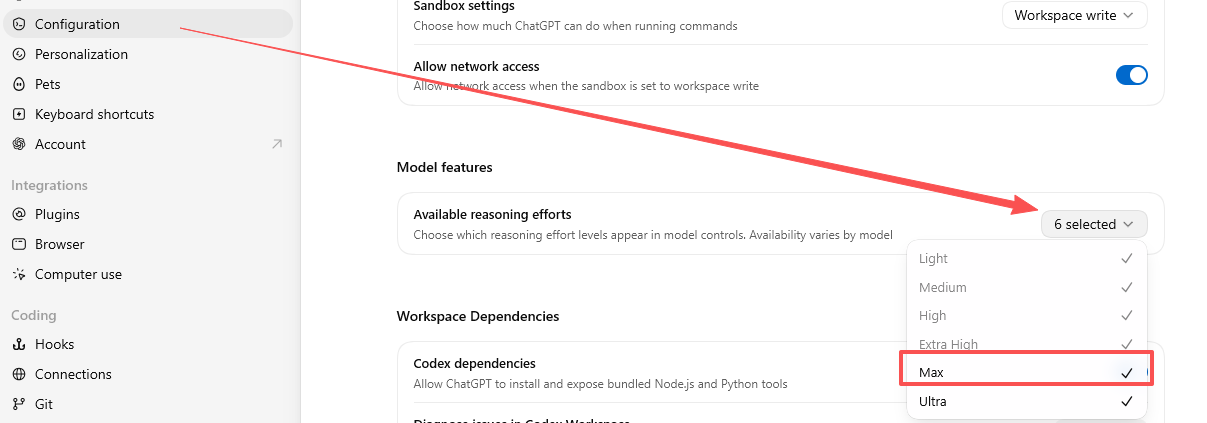
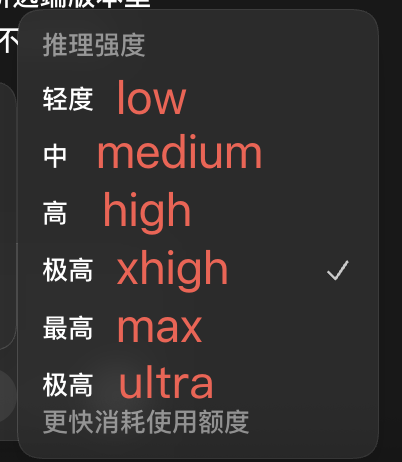
打开 Codex 设置 → Configuration → Model features → Available reasoning efforts,勾选 Max。之后即可在支持 Max 的模型控制中选择。

快速入口

打开 Codex 设置 → Configuration → Model features → Available reasoning efforts,勾选 Max。之后即可在支持 Max 的模型控制中选择。
快速换算 Codex 额度时,可以按 250 credits 对应 10 美元使用额度理解。
什么时间段拍卡最安全?
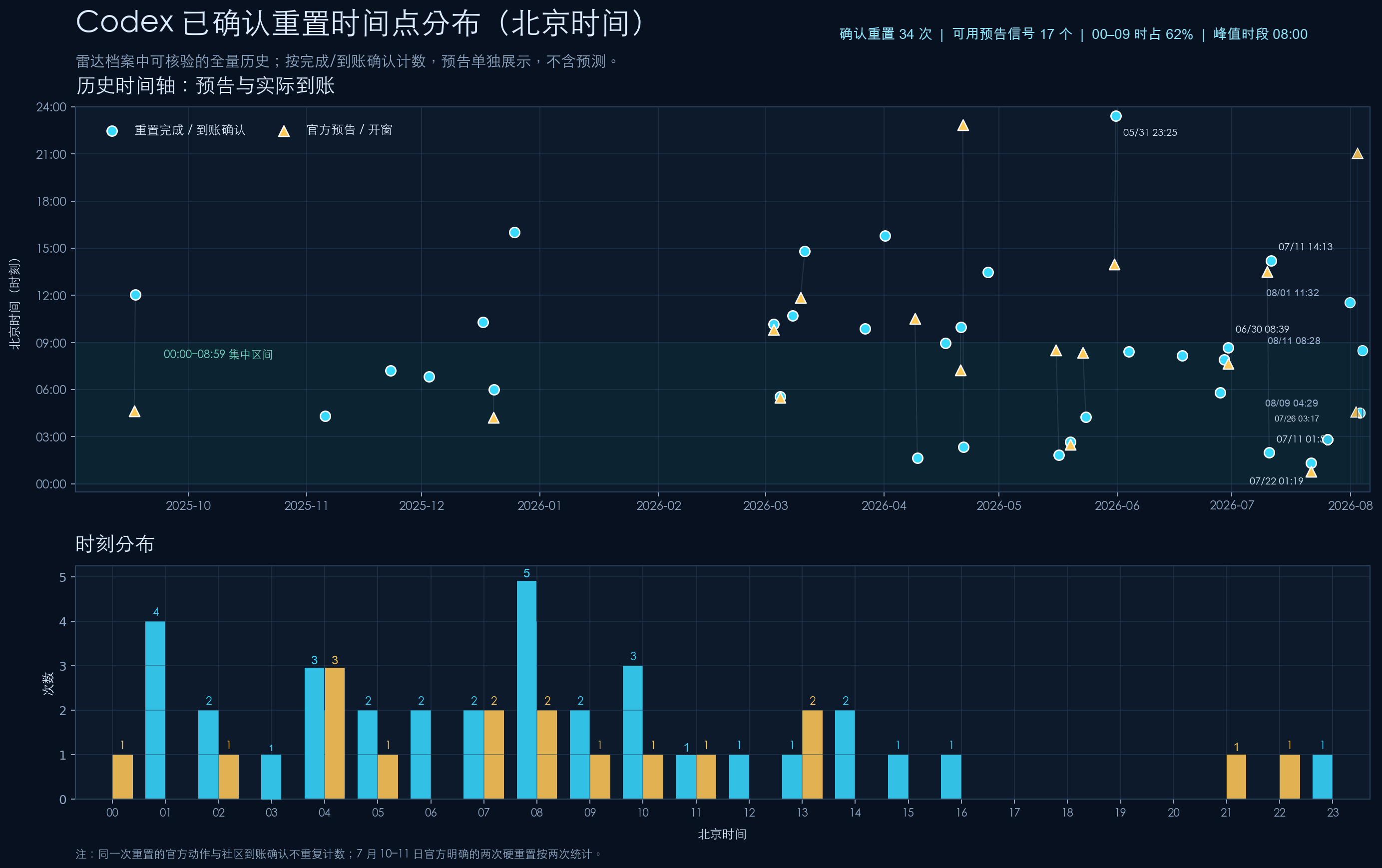
Codex 雷达可核验的 34 次历史重置中,21 次发生在北京时间 00:00–08:59;其中 08:00–08:59 以 5 次成为重置最高频时段。站长将 16:00–22:00 列为相对安全拍卡期;这是历史统计规律,不代表绝对不会重置。
根据最新分布式众测结果,按使用场景给出实用选择。
当前推荐以 Codex 订阅内可用模型为主;DeepSeek 采用独立 API 计费,将另行评估与推荐。 实时仅显示相对 24/48 小时均值持续明显下滑的模型档位。
实时正在读取更新时间
社区众测数据 · 每多一份贡献,结果就更准确。 前往贡献 →
备注:DeepSeek 数据采用 Codex + DeepSeek 官方 API 的方式,并使用 DeepSeek 官方接入教程进行配置。
选择一个或多个模型档位,对比历史数据。
请选择要比较的模型档位
备注:由于最近额度不稳定,暂停更新一段时间。
桌面每屏最多约 20 次;左右滑动或用箭头回看更早记录。
测试方法:Sol、Terra、Luna 均使用 low 推理强度,固定输出任务为从 1 数到 1024。Standard 与 Fast 各独立运行 3 次并取算术平均;顺序交替,最多 3 个模型配对并发执行,每个配对内 Standard/Fast 仍串行。每个样本使用新的 app-server 与 ephemeral thread,并加入随机 nonce;优先纳入 cached_input_tokens = 0 且输出完整的样本。本轮按真实体感放宽:慢速样本和完整但缓存不匹配的配对保留,输出不完整的样本才剔除并补跑。TTFT 为首个可见 token 延迟,TPS 为持续 Token 生成速度,E2E 为提交到完整结果的总耗时。顶部加速倍数均按 Standard 平均值除以 Fast 平均值计算;逐模型 E2E 体感加速也使用该模型的 Standard 除以 Fast。

英文原文@charlietlamb Only two misses
中文翻译@charlietlamb 只错了两个。
模型语境解读 · 参考比利时法语语感“misses”指前文列举的公司名称中有两个不符合或未命中,并非重置、限额或用量术语。
英文原文@Venkydotdev Hi
中文翻译@Venkydotdev 嗨。
模型语境解读 · 参考比利时法语语感普通问候;即使上文提到 Anthropic,也不涉及 Codex 的用量、限额、发布或重置。
英文原文@ishuagra02 You should actually try Codex instead of self-rationalizing. Usage included in the subscription is fantastic, even without my regular resets.
中文翻译@ishuagra02 你其实应该亲自试试 Codex,而不是自我合理化。订阅中包含的用量非常充足,即使没有我平时提供的重置也是如此。
关键词句Usage included in the subscription · even without my regular resets
模型语境解读 · 参考比利时法语语感“my regular resets”是对他以往不定期重置行为的概括,用来强调订阅自带用量已经很可观;这里没有给出新的重置承诺、时间或完成通知。
 AI 雷达蹬友群